Google Analytics is the tool that helps you understand your human audience, and dissect it.

But what actually is Google Analytics, and how does it work?
Everyone in the digital world is talking about it, because it is so widely used: Google Analytics is, by definition, a webmaster tool for tracking (yes, that’s the term) the users of the websites they own or manage. The way it works is fairly simple, even more so since the launch of Google Analytics 4. Thanks to a small JavaScript snippet installed on our site, we can find out with great precision what visitors do on our website, when they visit it and which source brought them there, such as social media or organic search. Google Analytics goes even further, as it also lets you see users’ journeys through your website and measure conversions. For SEO experts, for example, it is very useful to be able to see how much traffic is coming from search engines. With the features of Google Search Console, you measure a website’s health; with Google Analytics, its energy level.
It is easy to jump to conclusions about your SEO work. If a website’s traffic rises, it is not necessarily thanks to SEO improvements. It may be down to social media posts, a Google Ads campaign or an email campaign. We use Google Analytics to measure the share of traffic from each source, in detail: for traffic from search engines, for example, we identify what comes from Google, Bing or Yandex (a search engine widely used in Russia). Google Analytics is a digital audience measurement tool (free in its standard version) that reports data as practical, attractive charts and tables.
A real powerhouse
The first strength of Google Analytics is its ability to provide an impressive variety of data. The tool can go far, very far. The purpose of using Google Analytics runs deep. It is a real powerhouse, offering statistics on a quite simply impressive range of criteria and parameters. Want to know how many people visited a particular page? How much traffic arrives via a link from a partner site? How fast your pages load? What your pages’ abandonment (bounce) rate is? Which page drives the most traffic, and which attracts the least? Or which page generates the most exits from the website? Where your visitors are located? Which web browser and device they use to visit your site? Google Analytics will answer all these questions. It shows the channels that bring visitors to your site: a Google search, Facebook, an email, a Google Ads ad or a direct visit.
All this data is presented in reports predefined by the tool, as the screenshot below shows. Most of them are easy to understand and useful. The tool is flexible and the reports can be customised, so you can go straight to the data that is essential and a priority for your own marketing strategy.
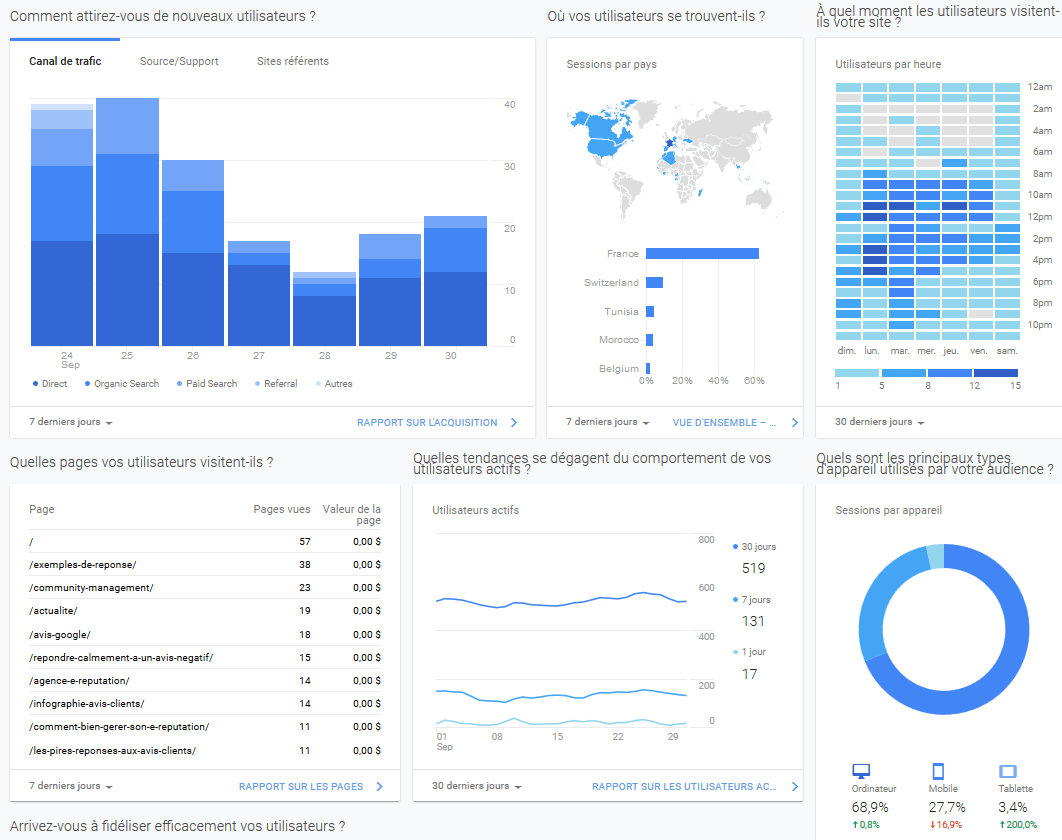
The existence of Google Analytics protects clients: the work of digital marketing agencies becomes transparent. At Digital Cuts, we demonstrate our credibility and our clients’ performance by providing Google Analytics reports together with our analysis and recommendations. This way, our clients can measure the impact of our work and make the best decisions with full knowledge of the facts. Transparency, support and helping our clients build their skills are essential to our battle plan. Measuring is good, but it is not enough. We go further for better performance.
How to use Google Analytics
The power and usefulness of Google Analytics do not rest solely on its wealth of data and features. The power comes from us, its human users. It is easy to install Google Analytics and read the data on your screen, but that only gets you halfway. Stopping there means losing the game and failing to tap its potential. It is essential to unlock the tool’s full power through human analysis: ours. Analysing data is at the heart of digital marketing’s strength and delivers more results. Passive data is useless. It is up to us, users and experts, to bring it to life through analysis. But how?
Let’s illustrate this with a simple example: imagine a page on a website has an abnormally high abandonment rate, known as the bounce rate (once again, it is up to you to define what counts as abnormally high). What should you do? React: work on the page to fix its performance and lower the bounce rate. For example, make the content more appealing, improve the layout or reduce the loading time. It is not always easy to judge what a good bounce rate is: at Digital Cuts, we generally base it on the average for similar pages on the site. If a page is a problem, we get to work fixing it and bringing it back to life, the aim being to increase traffic, optimise the user experience and build loyalty for more conversions and engagement. With Google Analytics, we breathe new life into your website.
Why use Google Analytics?
Collecting data is good. Analysing it is better. But putting it to work is better still. And that is where we make the difference. Putting data to work means extracting the very essence of what has been collected and analysed to drive the business forward and increase the conversion rate. It means optimising a multitude of combined parameters to energise the website, brand awareness and every digital activity undertaken. Writing and designing a newsletter, launching, monitoring and optimising a Google Ads campaign (SEA), optimising search engine traffic (SEO), creating content, user experience (UX) and strategy are all examples of digital activities that are optimised by putting Google Analytics data to work. All too often, the tool is under-used. They say humans use less than 15% of their brains: we can’t be far off with Google Analytics. At Digital Cuts, we strive to be creative and innovative, harnessing the power of every statistic and every feature in pursuit of our ultimate goal, the one that guides everything we do: ever greater performance, to keep improving our clients’ return on investment. We also offer Google Analytics 4 training courses with certification so that you can analyse and optimise your digital marketing yourself.
conversions per month
in potential revenue