Google Ads is the paid tool that lets you show ads in Google search results (SERPs) or on other websites (display), Performance Max and Google’s network partners. How do you use it well?

So what exactly is Google Ads?
People often talk about SEO (organic search), but far less about paid search (SEA, for Search Engine Advertising). Perhaps it’s the name itself, and the fact that you have to pay: instantly less sexy for SEO and digital marketing purists. Through the Google Ads interface, we can define SEA as a way of creating paid ads and showing them in various places across the web, usually in Google search results. By paying, you can rank first on Google for the search queries (phrases) of your choice.
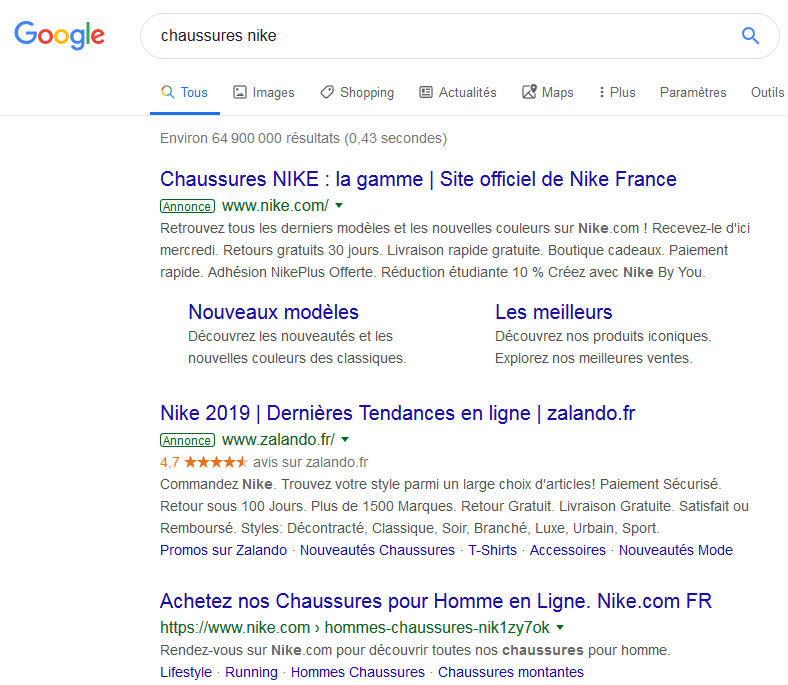
Most people don’t know what SEA is, and among those who do, many have the wrong idea about this marketing model. For many, all you have to do is pay to be number 1 on Google. Others will tell you that nobody clicks on paid ads any more (the screenshot below shows how they look in the SERPs). The reality is quite different. The Google Ads model charges advertisers for each click generated by the ad in question. The platform is built on this simple mechanism, which unlocks phenomenal power and a wealth of possibilities.
Firepower for visibility and conversions
The platform has many strengths, such as highly precise targeting. We have chosen 4 essential ones that are directly linked to the way the tool itself works. All of these advantages must be handled with care; each one has its weak points:
Cost per click
The platform’s first big advantage is its payment model. The advertiser only pays when someone clicks on their ad. That means there could be 2,000 impressions or views of the ad, and they won’t pay a thing if it doesn’t generate a single click. In other words, only the click costs money, unlike many other advertising formats. At first glance, you might think: “Brilliant, I won’t pay for views and I’ll get free brand awareness!” But thinking that way is very risky.
Speed
Another strength of Google Ads is its speed. You can launch a campaign in 30 minutes and quickly appear in the top positions of the search results. Unlike SEO, which can take weeks or even months to rank for competitive queries, SEA lets you reach the top of the SERPs without waiting. So a newly created website (young, with little SEO presence) can quickly win visits and conversions thanks to Google Ads. However, these advantages are not without their dangers.
Tracking and Analytics
Ads lets you track your campaigns: their effectiveness, the budget spent, the abandonment rate (known as the bounce rate) and the conversions generated. So campaigns are not launched on a wing and a prayer. They have to be monitored, analysed and optimised, and Google Ads has the tools you need built into its platform. To go further, we combine it with Google Analytics, which lets us analyse the performance of Google Ads campaigns in greater detail and with more precision. That way, you can understand what works and what doesn’t. We can run tests and experiments (such as A/B testing) to correct and optimise underperforming campaigns. Being able to track and analyse your Google Ads campaigns is more than an asset: it is central and essential, not least to protect yourself from the various risks and dangers lurking around SEA. Tracking and analytics are a matter of survival in the digital jungle.
How searchers actually use it
Some say that few internet users click on Google Ads: perhaps you’re one of them? In reality, several studies prove otherwise. More than half of Google search users admit they don’t realise they are clicking on a paid ad. There would be no point setting out the tool’s advantages if its ads didn’t get enough clicks. Internet users are clicking on ads more and more, at the expense of organic results (natural results, SEO), and they don’t necessarily notice: the format of “sponsored results” (paid ads) is increasingly discreet and differs little from organic results. It is in Google’s interest to generate as many clicks on its ads as possible: quite simply, they are its main source of revenue. Google Ads is an advertising model that is alive and well, and here to stay. Google Ads has enormous potential. But it’s not all rosy: its strength can also be a danger if we don’t use it properly or take the necessary precautions. Here is a quick overview of the dangers and the work needed to counter them:
Dangers and pitfalls that can quickly get you burnt...
Click spam
Click spam is one of the great abuses of SEA. You know that only clicks cost the advertiser money? So all it takes is clicking repeatedly on a competitor’s ad (often with different devices to change the IP address) to drain their budget and make them disappear from the search results. This practice really does exist. Even though Google tries to correct fraudulent clicks with its algorithm and IP address tracking, it can’t catch everything. Unfortunately, there isn’t much you can do about this scourge. The best defence is high-quality and, above all, well-targeted ads. By monitoring the clicks on your ads, we can spot illegitimate clicks and report them to Google: genuine monitoring and control work that takes time. Using Ads isn’t always that simple and can be risky.
Competition and high bids
Is SEA competition really a danger? Google Ads uses a bidding model to rank ads against each other. Put simply, whoever pays the most comes out ahead. When you know that Google only shows 3 or 4 ads at the top of the page, everyone fights to be first, because being at the bottom of the page or, worse, on page two means being invisible. Let’s take an example. Locksmiths in a big city will all buy the keyword “locksmith followed by the name of their city or neighbourhood”. And there may be a hundred of them, which drives bids up to very expensive levels. In Geneva, for example, a click can cost up to CHF 20 to appear at the top of the page. Fortunately, price isn’t actually the only factor in how Google Ads ranks ads. The quality of the ad, the landing page after the click, historical performance, the targeting of the audience the ad is shown to and other criteria are all taken into account by Google when ranking ads. That’s how we can outrank a competitor while paying less per click. Google favours high-quality ads (although the cost per click remains an important factor). This is what the industry calls the “Quality Score”: our job at Digital Cuts is to optimise it to lower the cost per click.
Low-quality clicks
The third scourge is low-quality clicks: they bring absolutely nothing to your business. Spam clicks are among them, but they are not the only ones. We often see campaigns that are poorly or too broadly targeted and reach huge numbers of people. You get lots of clicks, but what else? No calls, no completed forms, no purchases: just an empty click. For example, a Geneva locksmith buys the keyword “locksmith” and decides to target Switzerland and France. That means their ad can appear in Paris and anywhere else in France, or in Switzerland. In that case, people in Paris or Lausanne who click on the ad are simply wasted budget, since they won’t call on a Geneva locksmith (barring a miracle). And unfortunately, this will drain the advertiser’s budget (far too) quickly. Understanding how the tool works and being aware of its dangers is a prerequisite for optimising your campaigns. We can now move on to our tips and tricks for protecting yourself from the dangers of Google Ads, for optimised and therefore more effective campaigns and better budget management.
Our tips and tricks to protect and optimise your Google Ads campaigns
Choosing the right keywords, targeting and observing audiences
To avoid sinking your budget and your return on investment, targeting your ads correctly is an essential and extremely effective method: they only appear to the audience profiles you have defined. The better you target the audiences you want, the higher the quality of your clicks and the more value they will generate for your business. This groundwork is therefore done upstream, in the campaign strategy. Then, when you create your campaigns, you can refine the targeting of the people who will see your ad using a wide range of criteria: location, gender, age, device type, interests and many more. It is also important to choose the keywords you buy for the ad carefully. It is more profitable to select more specific phrases that are closer to the searcher’s end goal. For example, it is better to buy the key phrase “fast locksmith in Geneva” than simply “locksmith”. Choosing keywords and phrases comes down to common sense, together with Google Ads, which shows how often the phrases most searched for by your target audiences are used. Target your audiences precisely and observe them for better performance.
Taking care over the quality of your ad copy
To maximise brand awareness and sales, you aim for quantity and critical mass, but not at the expense of quality: one doesn’t work without the other. The more thought you put into your ads, the better they are targeted and the more concisely they are written, the higher the quality of the clicks they generate, the lower your costs and the higher your conversions into leads and sales. Copywriting (for your human readers, not just for search engine algorithms) therefore plays a big part in how effective your ads are. And that’s not all: quality doesn’t stop at the ad itself, but must also be built into the landing pages people are sent to after clicking on the ad. One of our biggest frustrations as Google Ads advertisers is when ad reports show excellent results (in views and clicks from target audiences, at a very low cost per click) but then, because the site is too slow for example, visitors leave without exploring it. You lose your prospects and the ad budget without the ad having done (enough) of its job. To measure your website’s performance, (Google) Analytics is there for you.
Using the right ad extensions
Google Ads lets you extend the content of your ads. To do this, the tool offers various extensions that give more information to people searching for your products or services.
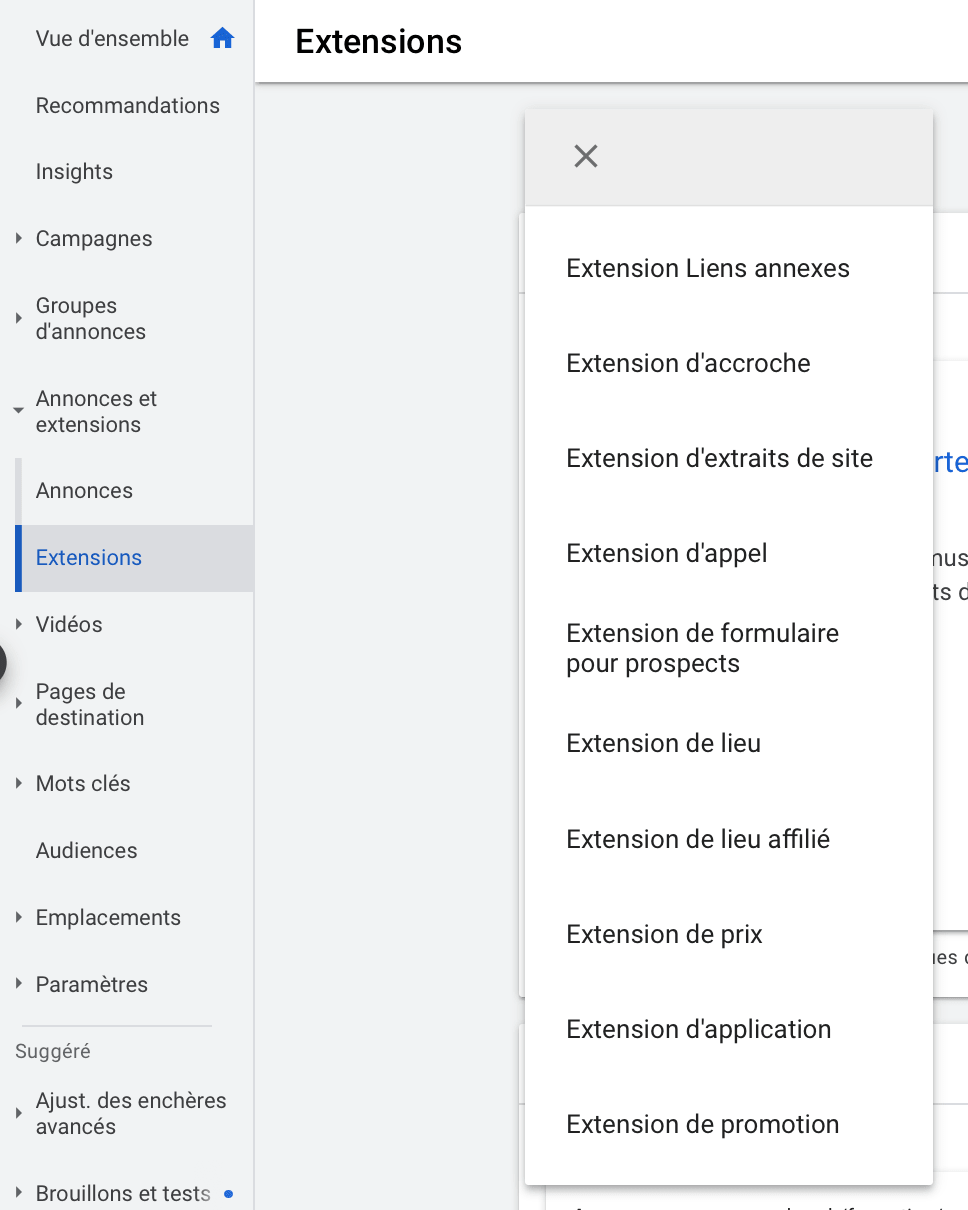
Depending on the goal and type of campaign, some extensions prove essential and will improve your performance. Of course, the trick here is not to try to use them all, but to use them consistently, so that they add value to your ads.
Optimising your landing pages
These are your landing pages: the pages people are sent to when they click on your ads. Their impact is significant, because even if you get hundreds or thousands of clicks on your ads, if nobody calls you, contacts you or buys your products, it’s practically pointless. Landing pages must therefore quickly answer the searcher’s query (problem). These pages must be optimised for conversion rate. In practical terms, that means relevant content that matches what the searcher was looking for (and clicked on). Next, the page must be mobile-optimised and fast enough to deliver a good user experience (UX). Finally, a clear, visible call to action, such as a “call”, “find out more”, “sign up” or “order” button, is recommended to optimise that all-important conversion rate.
Excluding irrelevant searches
With the negative keywords feature in Google Ads, you can avoid showing your ads for keywords that aren’t relevant to your business. Depending on your initial keywords and their match types, people may see your ad even if they didn’t type exactly the keywords you chose. Sometimes that’s not a problem, if it’s a spelling mistake, a synonym or a plural. However, if you run a meal delivery service, for example, and want to appear for the query “home meal delivery service”, your ad may show when someone searches for “meal delivery service job”. So, in the Search terms report in your Google Ads account, you can exclude in one click all the irrelevant keywords that needlessly burn through your budget.
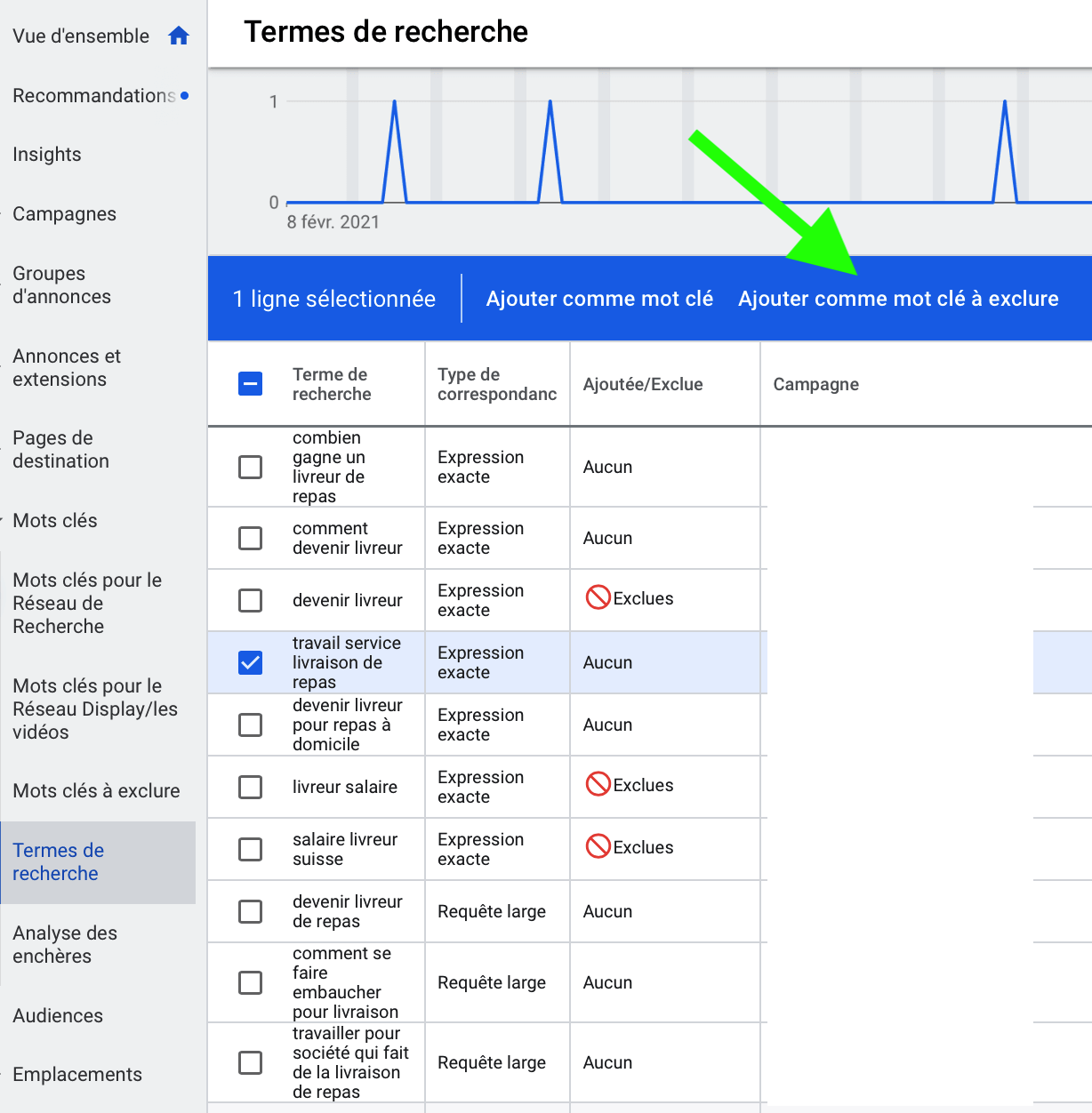
This is a good example of what you should exclude, for two reasons: you will pay for a click that probably won’t bring you a conversion, or it will lower your CTR (click-through rate). Either way, campaign performance will suffer. A Google Ads campaign manager’s job is to monitor all irrelevant searches and exclude them. This can be done daily for large campaigns, and weekly or monthly for smaller accounts.
Be wary of the optimisation score provided by Google
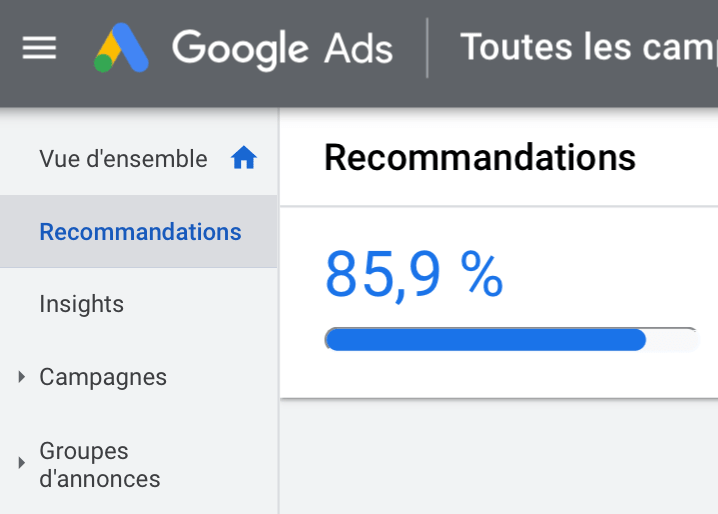
To help you optimise your Google Ads campaigns, the platform has a machine learning feature that offers automated recommendations. These can be of various kinds. For example, you’ll find suggestions to increase your budget, change your bidding strategy, add keywords, add priorities to your campaigns, add or edit ads, and many more. Stay wary, because an optimisation score of 100% doesn’t mean your campaigns will perform! Test, and use common sense before blindly applying all these recommendations, because no, automation doesn’t do everything, and human thinking still, fortunately, has a role to play.
Using Analytics
To measure the effectiveness of SEA campaigns, the winning combination is the statistics from Google Ads reports combined with those from Google Analytics. By tracking your campaigns directly in the Google Ads interface, you can monitor the number of views, clicks and conversions, your budget spend and various efficiency ratios. You can also report illegitimate clicks to Google. Ideally, campaigns are monitored and optimised daily. To go further, Google Analytics reports help you understand what visitors do on the destination website after clicking on the SEA ad: where they come from, their profile and their behaviour (which pages they visit, for how long, on which page they leave, etc.). What’s more, using Google Analytics well protects you against the dangers described above and maximises the effectiveness of all your campaigns.
At Digital Cuts, our passion is the performance of our clients’ online business. We draw on our extensive experience to propel and accelerate their business with digital campaigns. And we go further! We share our fascination and our knowledge through tailor-made Google Ads training courses using proven methods, and we demonstrate the success and impact of our work directly in the reports of Google’s own tools. One last danger we haven’t yet found a cure for: boosting performance with Google Search Console, Google Ads and Google Analytics becomes addictive.
Ad Rank = bid × Quality Score: a relevant ad can outrank a higher bid.